Feature · light IoT for hotels
Hold on to the room fee. Save on the power.
One guest room, told with the fewest possible devices: the guest does nothing, and the room saves its own power and guards its own room fee. Build cost per room falls by 1,000+ yuan at the same time.
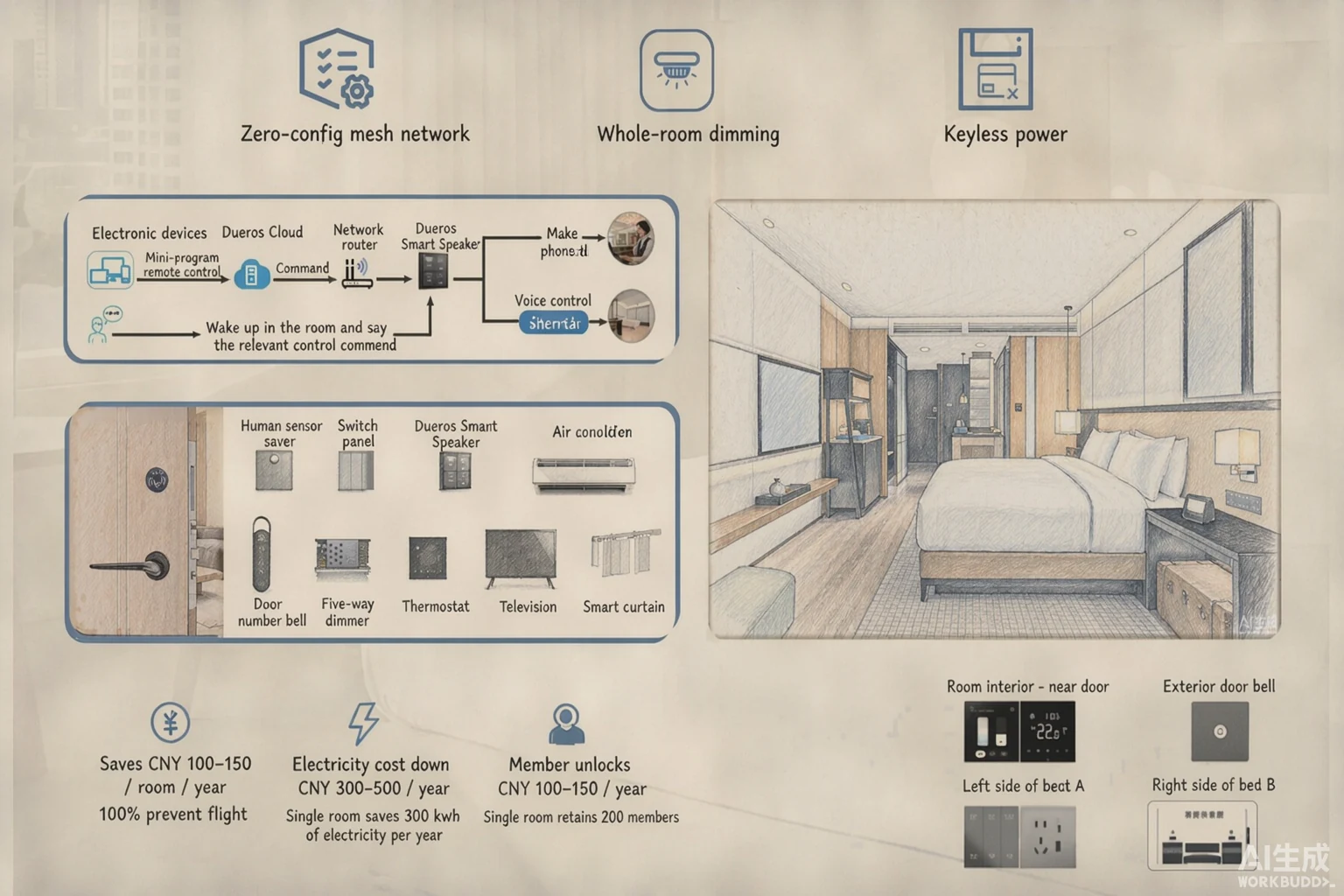
On a narrow screen, swipe sideways for the full image
What it is worth
Two leaks, both visible in the hotel’s own accounts.
Of the three accounts, room fee and electricity are the two that leak and can be plugged; member retention belongs with the key itself and is not opened up on this page. Neither of these leaks relies on a feeling of having saved something — both can be checked in your own operating accounts.
-
Account one · room fee
The room runs on even with nobody in it
Room-fee leakage prevented outside stays: cards bound to guests, entries logged; cleaning, inspection, viewings, maintenance and patrols each get their own maximum power window and cut off the moment the person leaves. For a hundred-room property that is a slice of revenue nobody sees being held on to.
-
Account two · electricity
The card is still there; the guest is not
Over-issued cards are common and most guests do not pull the card on the way out — the slot keeps the power on and the room idles along. Presence-based power cuts that idling off, running about four hours less a day than a card slot.
How does it know
With no occupancy sensor, how does it know whether anyone is in the room?
The test is not whether a card is in the slot but whether anyone is in the room — and everything it uses, the room already has: opening the door, throwing the deadbolt, touching the panel, calling Xiaodu, tapping a card. Together these actions are called presence events, and the platform decides on power accordingly; once the guest is gone it steps down through six-stage saving, stage by stage.
-
1. Trigger
Events from the lock and existing devices
- Door opened
- Deadbolt thrown
- Room-control panel touched
- Spoken interaction with Xiaodu
- A valid card sensed
All of it is already in the room — not one device was added just to sense.
-
2. Judging
Presence events B 9 types
- Confirmed present 7 types: panel, voice, valid card, inside lock…
- Possibly present 2 types: triggered presence sensing, room-control passive analysis
A confirmed-present event sets the room to occupied unconditionally; a possible-presence event only writes a log and triggers nothing.
-
3. Power
Power flags A 7 types
- A1 deadbolt · A2 PMS occupancy · A3 remote continuous power
- A4 door opened · A5 card sensed · A6 countdown · A7 operations event
Judged in combination: any one of them holds the power on; once the rest fall to zero a countdown starts (600 seconds by default) and the power cuts when it ends.
-
4. Saving
Six-stage saving C 15 min per stage
- C1 timing → C2 fan speed → C3 temperature hold
- C4 air off → C5 lights to 10% → C6 final saving
Starts the moment the room is left, 90 minutes in all, with no stage skipped.
◀ If a confirmed-present eventhappens during saving → saving stops at once and power returns
The guest experience
The guest does nothing at all.
The only thing the guest does is open the door. Everything else — corridor light, air conditioning, night light, saving — the room works out on its own. Each line below says what triggers it.
-
Walking in
Door opened → power flag A4
The corridor light comes on by itself; during a stay the preset welcome scene runs invisibly, told apart by day or night and first entry or a return, so it never intrudes.
-
While in the room
A confirmed-present event holds → B2 / B3 / B4
Air conditioning follows the booking tag: an A-grade guest has it pre-cooled at check-in and closed if nobody enters; an S-grade guest keeps a constant-temperature room. Day and night are configured separately.
-
Closing the door behind you
Door closed → the room is set to unoccupied unconditionally
Saving begins automatically; the six stages run in order, fifteen minutes each, with none skippable.
-
Up in the night
Continuous presence sensing → B2
Step out of bed and a night light comes on; the bathroom sits at 10% brightness, soft rather than harsh. Lights fade up and down, and the gradual change makes it feel considered.
-
Outside stays
Operations event → A7, with a maximum power window
Cleaning, inspection, viewings, maintenance and patrols each get their own maximum power window and cut off the moment the person leaves, so no light is left burning and no air conditioning left running.
Saving during a stay
Once the guest leaves, the room takes 90 minutes to shut itself down.
The six stages run in order, fifteen minutes each, with none skipped. If a confirmed-present event happens again during that time, saving stops at once and power returns — the guest is never left in the dark.
0 min15 min per stage · the air side ends at 45 min90 min
| Stage | Action | Note |
|---|---|---|
| C1 | Saving begins | Timing only, nothing else |
| C2 | Fan speed | Temperature unchanged, lowest fan speed sent |
| C3 | Temperature hold | Temperature stepped further, with different presets for winter and summer |
| C4 | Air conditioning off | It stops running |
| C5 | Lighting | Lights that are on drop to 10% |
| C6 | Final saving | All lights off, television optional; not run by default, can be enabled |
Even if the air conditioning is already off, a full 45 minutes still runs before lighting saving begins — the order is never skipped.
Working out the saving
300 kWh saved per room per year, and the arithmetic is open.
Evidence first, conclusion second: all four premises below come from PMS order data, and any hotel can check them against its own orders.
Premises · from PMS order data
- 19.6 hoursaverage hours a room is open per day
- 11.2 hoursaverage hours a guest is actually in the room
- 60%share of over-issued cards
- 80%of those, the chance the card is not pulled on the way out
Mind the definitions: 11.2 hours is hours the guest is actually in the room, while 11.3 hours is average powered hours once presence-based power is in use — two different quantities. Also: step 3 of the derivation uses “four months of air conditioning a year”, a fifth input that is not part of the PMS figures above.
The derivation · four steps
- Four hours less a day15.23 − 11.3 ≈ 3.93 hours (both are average powered hours)
- About 1,000 hours a year365 × 70% occupancy × 4 ≈ 1,022 hours
- About 340 hours of that on air conditioning1,022 hours × 4 months ÷ 12 months ≈ 340 hours
- ≈ 300 kWh a year · roomabout 30,000 kWh a year across 100 rooms
The most conservative reading: it leaves out the saving from cutting power itself and from lighting. Air conditioning is a kilowatt-class load and the main source of those 300 kWh.
| Guest behaviour | 100% card slot | 100% presence-based |
|---|---|---|
| Card left in, power not cut | 48 rooms | 0 |
| Card pulled on the way out | 52 rooms | 0 |
| Presence-based saving | 0 | 100 rooms |
| Average powered hours per room | 15.23 hours | 11.3 hours |
Deployment cost
1,000+ yuan less to build each room.
The same room, with nothing lost: three fewer device categories and one less chasing job.
- No door sensorSkip the door sensor and its purchase and fitting are both savedsave 100+ yuan
- No occupancy sensorNo extra sensor, so its purchase and wiring are both savedsave 300+ yuan
- Lighting run overheadThe lighting circuit goes through the ceiling, so no wall has to be chasedsave 500+ yuan
- No lamp driversLamps come without drivers, so sourcing costs lesssave 100+ yuan
1,000+ yuanless build cost per room
Saved on device purchase and fitting (three items) Saved on chasing the wall (one item) Unit: yuan per room
Delivery and questions
Power it up and it works, with no commissioning on site.
Nothing needs commissioning after installation, and if something goes wrong the hotel does not have to touch it.
-
Commissioning-free room control
Scan to add a device to its place in the room and it joins the network as soon as it is powered; once the power saver is online it distributes the cloud configuration to every device, with nobody involved.
-
Self-recovering room control
If a device fails, replace it from the back end: no site visit, the configuration comes back by itself and nothing is re-commissioned.
Can it be added to a hotel already finished?
Yes. Only one thing is essential: the lighting circuit runs through the ceiling, so no wall has to be chased again, and no door sensor is needed either. Where only minimal work is possible, the standalone Occupancy Power Saver with its own infrared and microwave sensing is the option.
Does it work without a PMS link?
Yes. Without a PMS link it uses A3 remote continuous power and defaults to “long-power automatic saving”: the power is not cut, and saving starts when nobody is there. It can also be set to follow the deadbolt alone.
Each point in depth on its own page: energy saving · room-fee leakage · the Occupancy Power Saver (the standalone hardware route) · lift and door access · ultimate silence · one-card。
Saving and risk logic · specs · FAQs
Light-IoT energy saving and risk control for hotels’s core test is not whether a card is in the slot but whether anyone is in the room: door-opening signals, the deadbolt, room-control touches, spoken commands and valid-card sensing make up presence events (B), which the platform aggregates into power flags (A) to decide on power; after the guest leaves it steps down through six-stage saving (C), stage by stage.
- The test
- presence events
- Not the card slot
- power flags
- 7 types
- A1–A7 judged in combination
- presence events
- 9 types
- Confirmed / possible
- Saving during a stay
- Six stages · 15 min each
- None skippable
- Cut-off delay
- 600 seconds by default
- Configurable
- Outside stays
- 9 operations scenarios
- A maximum power window
Power flags A (7 types)
| Flag | power flags | Note |
|---|---|---|
| A1 | Deadbolt thrown | Relies on the lock signal; can be disabled |
| A2 | PMS occupancy | Issued from the cloud with a stay end time; expires or is set to 0 remotely |
| A3 | Remote continuous power | Used when there is no PMS link, with no end time |
| A4 | Door opened | Relies on the lock signal; “power stays on while the door is open” can be enabled |
| A5 | Card sensed | With a fully automatic lock, a valid card confirms presence |
| A6 | Cut-off countdown | Starts once the other flags fall to zero, and cuts the power when it ends |
| A7 | Operations event | Used for risk control and operations access outside stays |
Presence events B (9 types)
| Flag | Event | Default |
|---|---|---|
| B1 | Power saver triggered presence sensing | Possibly present |
| B2 | Power saver continuous presence sensing | Confirmed present |
| B3 | Guest touches the room-control panel | Confirmed present |
| B4 | Xiaodu voice controls room control | Confirmed present |
| B5 | Xiaodu voice raises a guest request | Confirmed present |
| B6 | Room-control passive presence analysis | Possibly present |
| B7 | Remotely configured presence | Confirmed present |
| B8 | A valid card sensed | Confirmed present |
| B9 | Locked from inside (button or handle lift) | Confirmed present |
A confirmed-present event sets the room to occupied unconditionally; a possible-presence event only writes a log and triggers nothing. When the door closes, the room is unconditionally reset to unoccupied.
Common questions
Do we need a separate occupancy sensor?
No. Presence events come from devices the room already has — the lock signal, the deadbolt, room-control touches, spoken commands, valid-card sensing — so nothing extra is fittedan occupancy sensor, and both the hardware and the work are saved. Where a standalone Occupancy Power Saver with its own infrared and microwave sensing is used, it is configured as that product requires.
If a guest sits still, will the room think it is empty?
No. Continuous presence sensing (B2) and room-control passive analysis (B6) decide together, and if a confirmed-present event happens while saving is running, saving stops at once and power returns.
Will the six stages leave a guest in the dark?
No. C1–C3 do not touch the lighting at all, working only on the air side; lighting only drops to 10% at C5, and C6 does not run by default. A confirmed-present event at any stage stops saving immediately.
Does it work without a PMS link?
Yes. Without a PMS link it uses A3 remote continuous power and defaults to “long-power automatic saving”: the power is not cut, and saving starts when nobody is there. It can also be set to follow the deadbolt alone.
Why cut the power outside stays at all?
Cleaning, inspection, viewings, maintenance and patrols each get their own maximum power window, avoiding lights left burning and air left running; together with entry logging, it closes the room-fee leak at the source.
Where does the 300 kWh come from?
See “300 kWh saved per room per year, and the arithmetic is open” on this page: it is derived from a PMS average of 19.6 open hours a day, 11.2 hours with the guest in the room and 70% occupancy, and it is conservative.
Can it be added to a hotel already finished?
Yes. Only one thing is essential: the lighting circuit runs through the ceiling, so no wall has to be chased again, and no door sensor is needed either. Where only minimal work is possible, the standalone Occupancy Power Saver with its own infrared and microwave sensing is the option.
Risk control outside stays: nine operations scenarios
| Scenario | Power policy | Room control and device links |
|---|---|---|
| No operations access | A maximum power window | Lighting, air and television follow configuration, and cut off when the person leaves |
| Cleaning | A maximum power window | Curtains and spoken announcements can be configured |
| Hygiene inspection | A maximum power window | Curtains and spoken announcements can be configured |
| Showing a guest | A maximum power window | Welcome lighting and air can be configured |
| Room maintenance | A maximum power window | Follows the work-order scenario |
| Periodic deep clean | A maximum power window | Follows configuration |
| Patrol of unsold rooms | A maximum power window | Follows configuration |
| Checkout in the PMS | A2 falls to zero at once | Saving logic takes over, so power does not stay on after checkout |
| Dirty room to clean | Follows room-state policy | Works with entry logging to hand over to the next stay |
The outside-stay policies only run when A2 is 0 (they do not run while A2 is 1), and they depend on network connectivity for the cloud to issue them.